Maletta Script Font for Handmade Labels & Printables
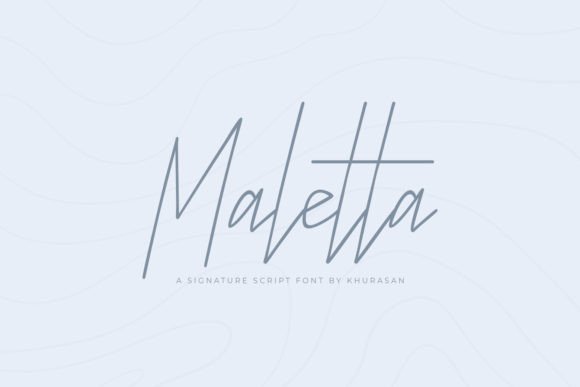
If you’re a maker who prints candle labels, cuts vinyl stickers, designs wedding invites, or sells digital planner pages on Etsy—you know how much the right script font can elevate your entire product line. Maletta isn’t just another decorative typeface. It’s a clean, stylish, modern, and elegant script font that balances artistry with real-world usability—exactly what crafters need when every detail impacts customer trust and perceived quality.
Maletta has that rare warmth you want in handmade branding: soft curves, confident spacing, and subtle contrast between thick and thin strokes. It feels intentional—not fussy, not overly ornate—but undeniably refined. Think of it as the kind of script you’d choose for a boutique soap label, a farmhouse-style welcome sign, or a minimalist baby announcement. It reads clearly at 12pt on a printed tag and still shines at 120pt on a gallery-wrapped canvas print.
For physical product makers, Maletta works beautifully on small-format items where legibility matters. I’ve used it for 1-inch round sticker labels on lavender sachets—and yes, the lowercase “a” and “e” stay distinct even at tiny sizes. On Cricut and Silhouette machines, Maletta cuts cleanly thanks to its open letterforms and generous counters. No tangled swirls or fragile terminals that snap during weeding. That’s huge when you’re cutting 500+ tags for a holiday market.
It’s especially strong for short, high-impact text: names on wedding place cards, shop names on kraft paper tags, flavor names on jam jars (“Honey Lavender,” “Spiced Pear”), or seasonal phrases like “Gather & Give” on printable wall art. Maletta isn’t built for body copy—but that’s by design. As a display font, it draws attention *where you want it*: the headline, the monogram, the tagline beneath your logo. Pair it with a friendly sans serif (like Montserrat or Poppins) for balance—your script does the charm, your sans handles the clarity.
I keep Maletta in my core font kit for three go-to projects: first, boutique packaging—especially for skincare, tea, or artisan chocolate lines where elegance signals care and craftsmanship. Second, digital downloads: wedding suites, birthday party bundles, and planner inserts all gain instant polish with Maletta headings and section dividers. Third, cut files for SVG creators—its smooth outlines convert reliably to vector paths, and the natural flow makes hand-lettered effects feel effortless.
Seasonal sellers will love how Maletta adapts. Its neutral sophistication means it doesn’t scream “Christmas” or “Easter”—so you can use the same font year-round across spring botanical labels, summer farmers’ market banners, autumn harvest signs, and winter gift tags. No visual whiplash. Just consistent, elevated brand identity.
When designing for mockups—whether Canva templates, Procreate stationery layouts, or Adobe Illustrator packaging comps—Maletta renders crisply at any resolution. And because it’s part of the Script Amp collection, it comes with thoughtful extras: standard ligatures (like “fi” and “fl”) that prevent awkward collisions, optional swashes for special accents (perfect for invitation flourishes), and alternate characters for subtle customization. File formats include OTF and TTF, so whether you’re in Silhouette Studio, Cricut Design Space, or Affinity Publisher—you’re covered.
Readability tips for crafters: avoid stretching Maletta horizontally—it loses its rhythm. Stick to its natural width. For small stickers under 0.75”, skip swashes entirely and use the base character set. When layering over textured backgrounds (like linen or watercolor scans), add a subtle white stroke or drop shadow—Maletta’s fine details pop best with gentle contrast. And always test print a sample before bulk runs: some inkjet printers soften thin strokes, while laser printers hold crispness better.
Font pairing is where Maletta truly shines in production. Try it with a warm, low-contrast sans serif (like Quicksand or Nunito) for friendly, approachable brands—or pair it with a sturdy, slightly condensed serif (like Playfair Display) for luxury positioning. Avoid pairing with other scripts unless one is extremely restrained (e.g., Maletta + a minimal monoline script). Too many competing personalities dilute your message.
One thing I always double-check before listing a new printable or template? Licensing. Maletta is a commercial font, meaning you’re fully cleared to use it in products you sell—physical labels, digital downloads, SVG cut files, t-shirt designs, and client work. Just make sure your license covers the scope: if you’re bundling fonts into editable Canva templates or selling layered PSD files, confirm Maletta’s EULA permits end-user editing. Most premium script fonts do—but it’s worth verifying once, not risking a takedown later.
You’ll notice Maletta doesn’t try to be everything. It doesn’t mimic chalkboard scrawl or calligraphy ink bleed. Instead, it offers quiet confidence—the kind that makes customers pause, read, and remember. That’s why it works on a $4 sticker and a $295 wedding suite alike. It says “handmade with care” without shouting. It supports your story instead of competing with it.
Whether you’re updating your Etsy banner, designing a new line of greeting cards, or prepping holiday packaging for your small-batch candle business—Maletta is the kind of script font that earns its place in your toolkit. Not because it’s trendy, but because it delivers: beauty that cuts well, reads clearly, scales gracefully, and helps your handmade goods stand out—gently, authentically, and elegantly.